


Good Pizza, Great Pizza
4.731.14K Reviews
App Specs
- Version
- 5.56.0
- Updated On
- License
- Free
- Downloads
- 100,000,000+
- Developer
- TapBlaze
- Categories
- Casual
- Platform
- Android, iOS
Screenshots
 Analysis by AppCompare
Have you ever found yourself craving a slice of pizza but without the hassle of making a call or finding a nearby pizzeria? Welcome to the world of Good Pizza, Great Pizza, a game that will have you tossing dough and sprinkling cheese in no time. As someone who loves both gaming and a good pizza, this app was right up my alley, and here’s why it should be on your download list too.
Getting Started with Dough and Sauce
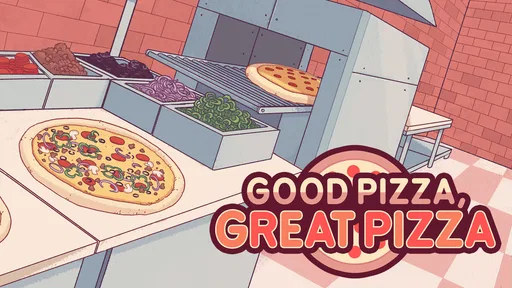
When I first opened Good Pizza, Great Pizza, I was immediately greeted by the charming graphics and catchy tunes that set the stage for a delightful pizza-making adventure. The game starts you off with your very own pizza shop, and trust me, it feels like you’re stepping into a quaint little eatery where everyone knows your name.
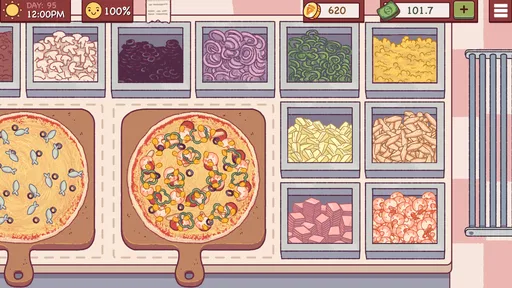
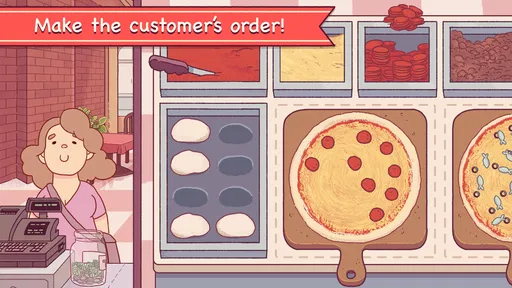
The tutorial is super friendly, guiding you through the basics of making pizza. You’ll get to knead the dough, spread the sauce, and add toppings with a simple tap and drag mechanism. It’s surprisingly intuitive and makes you feel like a pizza pro in no time. I appreciated how the game didn’t overwhelm me with too much information at once. Instead, it let me learn as I cooked, which kept the experience fun and engaging.
Finding a Comfortable Rhythm
The most useful habit I developed was treating each order as a short sequence rather than one vague instruction. I read the request first, identify the crust and sauce, then add toppings before sending the pizza to the oven. That small pause at the beginning helps prevent the costly, irritating mistake of building the wrong pizza quickly. When an order includes a split, I take a moment to map which ingredients belong on each half instead of relying on memory while dragging toppings around.
This is a casual game, but it rewards attention more than frantic tapping. If I rush through a customer’s wording, I’m more likely to overlook a detail; if I keep a steady pace, the preparation feels almost meditative. For a short break, I can focus on a couple of orders and stop when I’m ready. It also works when I want a longer session, though the repeated preparation becomes more noticeable the longer I play.
Settings That Shape a Session
Before settling into a routine, I recommend checking the game’s available settings and adjusting the sound to suit where you are playing. The cheerful music and effects are part of its personality, but they may not be ideal in a quiet waiting room or late at night. Muting or lowering audio, where the relevant controls are available, makes it easier to play discreetly without changing the basic appeal of the artwork and character animation.
I also think about the kind of attention I can give before opening the shop. This is not a game I choose when I need to watch a video or answer messages every few seconds: orders ask me to read, prepare, and respond. A calmer moment makes the customer requests more enjoyable and reduces avoidable errors. The game’s free entry makes it easy to try, while optional in-app purchases range from $0.99 to $99.99 per item, so I’d review purchase prompts carefully if I share a device or want to keep spending controlled.
Worth Reading Before You Choose

Flipboard Shows What News Apps Must Do Beyond the Feed

Switching to Android Auto Means Rethinking Your Driving Routine

Google Calendar Makes a Crowded Week Easier to Manage

Ludo King Makes the Most of the Minutes Between Plans

Baby Panda World Brings Quick Play to Modern Phones, but Its Game Library Feels Busy

ESPN’s Live Game View Makes Following Close Games Easier
Customer Orders: A Slice of Challenge
Once you’ve got the basics down, it’s time to open your doors to hungry customers. And here’s where things get interesting. Customers come in with specific orders, and it’s your job to make sure you get them right. Some might ask for a simple cheese pizza, while others have a more, shall we say, creative taste. Ever heard of a half-pepperoni, half-pineapple pizza? Well, you’re about to make one.
The challenge ramps up as you progress, with customers becoming more particular and your time to complete orders getting shorter. It’s a great way to test your multitasking skills, and I found myself eagerly trying to beat my previous day’s earnings. The game’s difficulty progression feels just right, keeping me on my toes without ever feeling impossible.
Repeatable Habits for Busy Orders
When several customers are waiting, consistency matters more than trying to move at top speed. I read the full order before touching the ingredients, then use the same topping-by-topping approach each time. For a pizza with different halves, I mentally divide the surface first and work on one side before the other. It is a simple method, but it keeps my hand from wandering across the whole pie and makes the finished order easier to check.
I also treat the oven as a point where I reset my attention: once a pizza is in, I turn to the next task only after confirming that the current order is complete. That avoids carrying an unfinished instruction in my head while starting another. If I am playing when tired, I slow down rather than trying to compensate with faster taps. There is a satisfying rhythm to serving accurately, and chasing speed at the expense of correct orders tends to make the session more frustrating, not more efficient.
Upgrades and Customization: Your Pizzeria, Your Rules
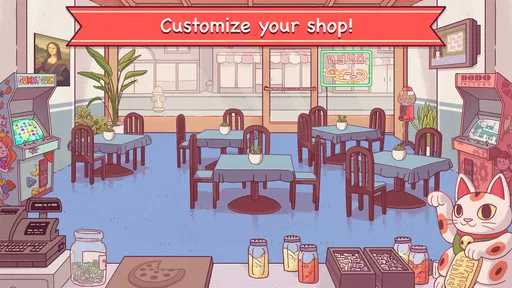
One of my favorite aspects of Good Pizza, Great Pizza is the ability to upgrade and customize your shop. As you earn money from satisfied customers, you can invest in new toppings, better ovens, and even decor to make your pizzeria stand out. It’s like a mini-business simulator nestled within a fun cooking game.
The customization options allowed me to put my personal touch on the place, and watching my little pizzeria grow from a humble stand to a bustling hotspot was incredibly rewarding. Plus, the upgrades aren’t just for show; they genuinely help you improve your efficiency and customer satisfaction.
Choosing Upgrades with a Purpose
I find it more satisfying to think of upgrades as a response to the way I play, rather than buying everything just because it appears. If I’m struggling to keep orders moving, an improvement that supports preparation is easier to appreciate than a purely decorative choice. If I already feel comfortable with the pace, customizing the shop can be a welcome reward instead. That distinction matters because the game mixes hands-on cooking with small-business progression: one part asks for careful execution, while the other lets me shape the atmosphere.
There is a trade-off, though. Unlocking more ingredients can make the menu feel richer, but it also gives me more details to keep straight when orders become demanding. I wouldn’t treat every new option as an automatic boost to ease. For someone who enjoys learning a growing set of requests, that added complexity is part of the appeal; for someone who wants the same simple task every time, progression may make the routine busier than they want.
Visuals and Sound: A Feast for the Senses
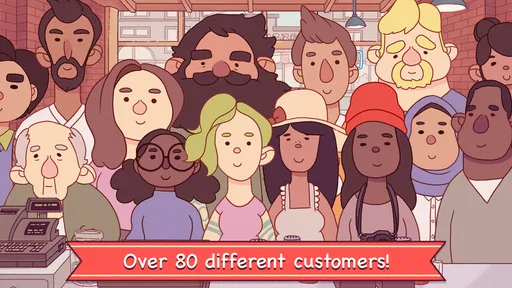
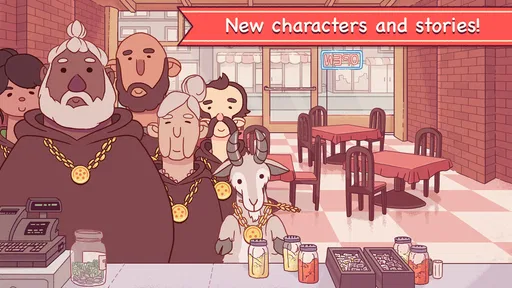
Let’s talk about the visuals and sound because, honestly, they are a big part of what makes this game so charming. The art style is colorful and quirky, perfectly matching the light-hearted tone of the game. Each character has a unique look, and the animations are smooth, making the whole experience visually pleasant.
The soundtrack deserves a special mention. It’s upbeat and catchy, setting the perfect mood for a busy day in the pizzeria. I found myself humming the tunes long after I’d put my phone down, which is a testament to how enjoyable they are.
Who Will Enjoy This Pizzeria?
I’d recommend it to people who like light management games but want more interaction than tapping through menus. Making each pizza gives the business side a tactile, hands-on feel, and the customer requests provide a clear goal for each order. It is also a good fit for someone who likes gradual improvement: learning to read requests accurately and deciding how to use earnings gives each session a small sense of progress without turning it into a demanding strategy game.
A realistic time to play is during a lunch break or while waiting for an appointment, when you have a few minutes to concentrate on a run of orders. It is less suited to a moment when you need to keep switching away from the screen, since interruptions make it easier to lose track of what a customer asked for. Parents may also appreciate that the content rating is Everyone, though purchases are available, so device purchase controls are worth considering for younger players.
How It Compares with Other Casual Games
Compared with a typical idle or match-style casual game, this one asks for more active input. I’m not simply waiting for a meter to fill or making the same move on a puzzle board; I read a request and assemble a specific order. That makes the play feel more personal, but it also means it is not my first choice when I want something I can operate with almost no attention. Among cooking games, its appeal is the balance between straightforward gestures and the extra pressure of serving customers correctly.
TapBlaze has built a recognizable, cozy setting around that loop, and its broad audience is reflected in a 4.7 average from around 1.8 million ratings and over 100 million installs. It is free to start, rated Everyone, and the current version is 5.51.2, with Android support beginning at version 6.0. Those details make it approachable for many players, but they do not change the central question: do you enjoy repeating a hands-on cooking routine and improving your accuracy? If not, a puzzle game or a more passive simulator may suit you better.
Where the Routine Can Wear Thin
The main limitation for me is repetition. Dough, sauce, toppings, and oven work are charming at first, but the core motions remain familiar, so players who need constant changes in mechanics may eventually lose interest. The rising order pressure can add tension, yet it does not turn the game into a deep restaurant-management simulation. I see it as a focused cooking game with business-flavored progression, not a full toolkit for designing every part of a restaurant.
There can also be a small gap between understanding an order and executing it neatly on a touchscreen. Careful placement takes attention, and speedier moments can feel less relaxing than the cozy presentation suggests. I find that acceptable when I’m in the mood for a light challenge, but I would skip it if I wanted a completely stress-free background activity. The best sessions are the ones where I can give the requests a little focus instead of treating the game as something to play on autopilot.
Final Thoughts: A Slice of Joy
In conclusion, Good Pizza, Great Pizza is a delightful game that combines the joy of cooking with the challenge of running a business. It’s a perfect escape for those moments when you want to unwind and have fun. Whether you’re a pizza enthusiast or just someone looking for a new game to try, this one is definitely worth a download.
The blend of intuitive gameplay, charming graphics, and a dash of humor makes it a standout in the app world. So, grab your apron, fire up those ovens, and let’s make some good pizzas that’ll make anyone say, "Great Pizza!"
Pros
- Engaging storyline with fun characters.
- Simple
- intuitive controls for all ages.
- Frequent updates with new content.
- Visually appealing art and design.
- Offers offline play mode.
Cons
- Can become repetitive over time.
- In-app purchases can be pricey.
- Difficulty spikes in later levels.
- Ads can interrupt gameplay.
- Limited customization options.
FAQs for Good Pizza, Great Pizza
What is the main objective of Good Pizza, Great Pizza?
Good Pizza, Great Pizza is a simulation game where players manage their own pizza shop. The main objective is to make pizzas according to customer orders while managing ingredients and resources efficiently. Players strive to earn profits, improve their shop, and outperform their in-game rival, Alicante. It's a blend of time management and strategy.
Is Good Pizza, Great Pizza free to play?
Yes, Good Pizza, Great Pizza is free to download and play on both Android and iOS devices. However, the game includes optional in-app purchases that can enhance gameplay. These purchases might include additional coin packs or exclusive ingredients that help in upgrading the pizza shop and improving customer satisfaction.
What type of gameplay can I expect in Good Pizza, Great Pizza?
Players can expect a combination of time management and strategy gameplay. You'll take customer orders, prepare pizzas with various toppings, and serve them quickly to earn money. The game challenges you to manage your resources carefully, upgrade equipment, and keep customers happy to progress through increasingly difficult levels.
Are there any special features in Good Pizza, Great Pizza?
Yes, the game offers a variety of special features, including a diverse cast of quirky customers, each with unique preferences and personalities. Players can upgrade their shop with new equipment and decorations, and participate in special events that offer unique challenges and rewards. The game also features charming, hand-drawn graphics and a humorous storyline.
Does Good Pizza, Great Pizza require an internet connection to play?
Good Pizza, Great Pizza can be played offline, making it a great option for gaming on the go without the need for a constant internet connection. However, certain features, such as in-app purchases and updates, may require internet access to function properly. Always check for the latest updates when online to ensure the best gaming experience.


